
Why these margins exist
Folding and trimming carry normal, acceptable variation. Those variations compound as a publication moves through manufacturing, and the more pages and sections it contains, the more they add up. Bleeds and safety margins are how a layout absorbs that movement without anyone noticing it in the finished piece.
Bleeds
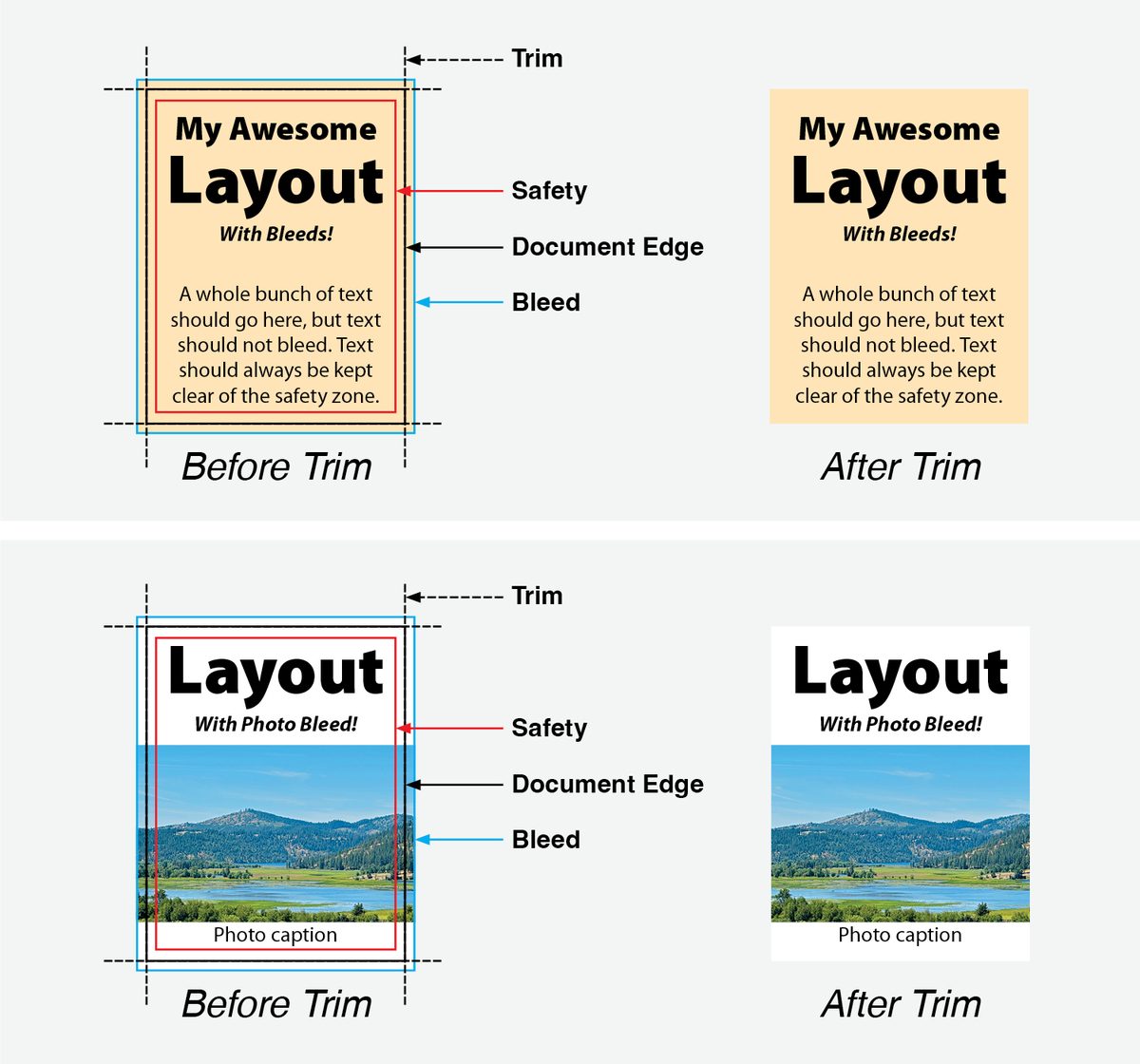
Any element intended to reach the edge of the page is a bleed — a photo, a background color, a rule, anything.
Elements that bleed must extend 0.125″ beyond the edge of the document. That gives the trimmer material to cut away, so you don't end up with a sliver of white along the edge of a page.
Set your document bleed to 0.125″, then check that anything meant to reach the edge actually extends all the way out to the bleed guide. Stopping at the document edge is the most common version of this mistake, and it looks fine on screen.
Safety
The safety zone is the area where content is far enough from the page edge that it won't be trimmed off. Anything closer than 0.125″ from any edge is too close to trim.
Perfect bound publications
Perfect bound pages are glued at the spine, so content near the spine can disappear into the binding.
| Safety from all outer edges | 0.125″ |
|---|---|
| Safety at the spine | 0.375″ |
| Spine safety — inside covers, first and last text pages | 0.625″ |
Building a perfect bound cover? See perfect bound cover spreads for sizing the spread and positioning the spine.