
Pages
We strongly recommend a professional page layout program such as InDesign or QuarkXPress for building your layouts.
Build every page at the final trim size of your publication. If your finished magazine is 8.375″ × 10.875″, your document should be 8.375″ × 10.875″ — not larger, and not with the bleed built into the page size.
| Document size | Final trim size |
|---|---|
| Bleed beyond trim | 0.125″ |
| Minimum from trim to copy | 0.125″ |
| Minimum from spine, perfect bound | 0.375″ |
| Minimum from spine — inside covers, first and last text pages | 0.625″ |
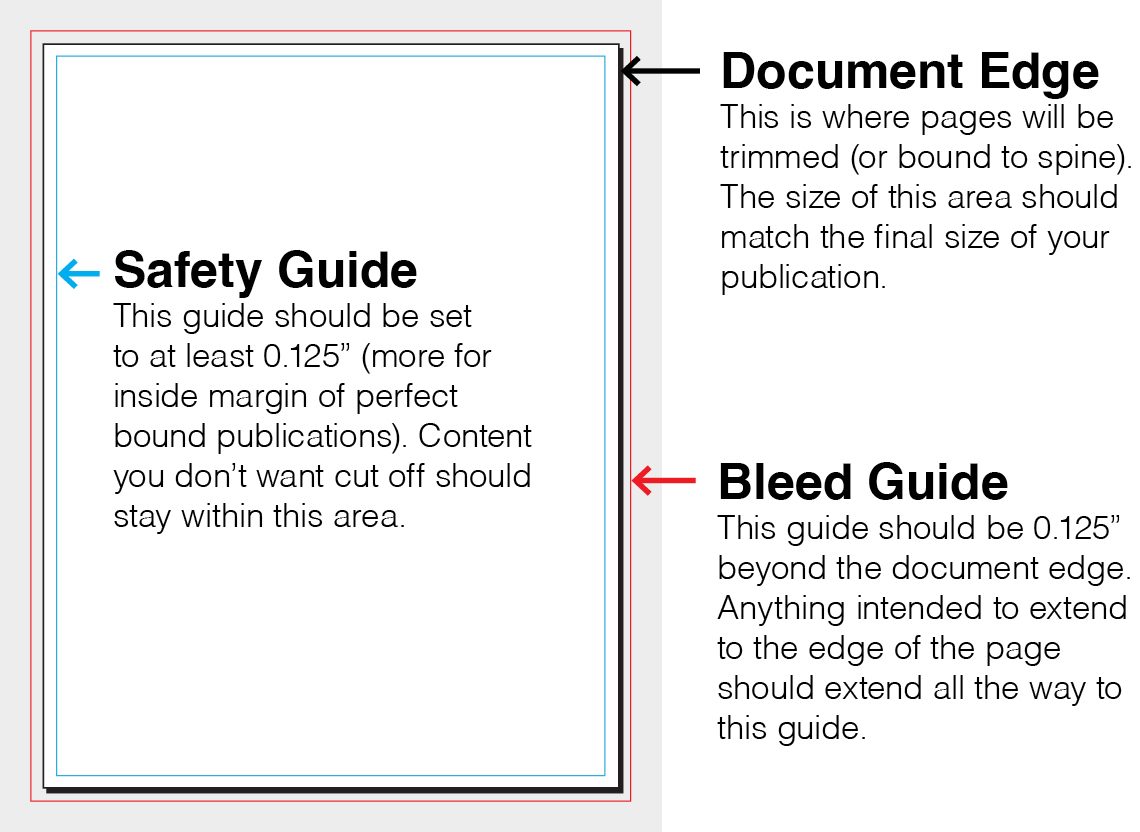
For why these margins exist and what happens when they're wrong, see bleeds and safety.
Text
- Black text must contain black only — no cyan, magenta or yellow, and no RGB black.
- Type over white or light backgrounds should be black or very dark. Type over black or dark backgrounds should be white or very light.
- Black text should be a minimum 6 pt sans serif medium.
- Reverse type should be a minimum 8 pt sans serif bold.
- Overprint type should be a minimum 6 pt sans serif bold.
Choosing fonts
Pending David. The source document says Google fonts are built for low-resolution web work and don't embed properly. That isn't accurate — Google Fonts ship as standard TTF/OTF and embed normally. The practical advice underneath is sound, so it's rewritten below to say the same thing accurately. A designer who hits the original line will discount the rest of the page, and designers are the audience here.
Use fonts from a reputable foundry. Font problems are one of the more common causes of a page failing preflight, and the cause is usually the same: some free and low-cost fonts are built with errors, and some carry restrictions that prevent them being embedded in a PDF at all. When a font can't embed, text may reflow, render incorrectly, or not print.
If a font fails preflight, that's almost always why. Our technical service team can help you identify which one is causing it.
Images and rules
- Photos and other images should be 300 dpi at the size they will be used.
- Specify U.S. Web Coated (SWOP) v2 as your CMYK profile before converting from RGB.
- Specify a line thickness for rules so they stay consistent. Avoid hairline rules — they can disappear or print unevenly.
Ready to export? Run through the preflight checklist before you create your PDFs.